Changelog
Improved security with our Content Security Policy
ImprovementWe've upgraded our platform's security by implementing a Content Security Policy (CSP). This addition adds an extra layer of protection, much like the perfect topping on a well-baked pizza. By controlling which resources are loaded and executed, we maintain the integrity of our services.
Access control
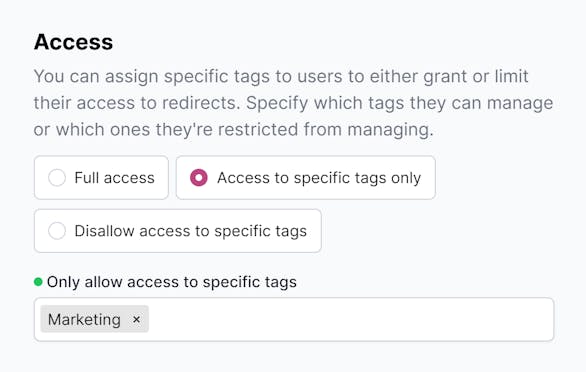
New featureBig news in team management! Our latest update introduces refined user-level permissions, allowing for detailed access control. Assign specific tags to users or restrict certain tags, ensuring precise and secure role assignment. This streamlined approach to permissions management simplifies secure access, enhancing both efficiency and safety.
Read more here.
Available from the Business plan and up.
AI chat bot
New featureWe've partnered with Algomo to create a custom AI chat bot called Gino for our redirect.pizza free tier base. Gino can help you with setting up your first redirect, making the DNS change, or anything pizza related.
Live human chat is still available like expected for our paid customer base. Email support for our Free tier is still available as well.
This is a beta test; subject to change.
Auto trailing slash path variable
New featureWe’ve added a new {path:auto_trailing_slash} destination variable to be used in your destination. This variable automatically adds a trailing slash to the end of the variable value, if the path itself doesn’t end with a trailing slash, and the last segment doesn’t contain a dot (i.e. isn’t a file extension). This can be used for niche use-cases, where the destination always requires a trailing slash.
Dedicated IP: X-Forwarded-For Support
New featureWe've added X-Forwarded-For support to our Dedicated IPs to enable a middleware proxy to forward the client's IP.
This can be especially useful when using redirect.pizza as a headless redirect provider, where the redirect is executed within the CMS or CDN layer, powered by the powerful redirect.pizza matching engine. Passing along the correct client IP will result in a better analytical overview and the ability to steer traffic based on IP information, such as country.
Changelog RSS feed
ImprovementNow you can keep up with the redirect.pizza changelog using good ol' RSS. Check out the feed here: redirect.pizza/changelog.rss
View request duration in tester
ImprovementSmall improvements matter: we’ve added the request duration to our redirect tester, so you can see how long it took to process your redirect.
Improved source delete UX
ImprovementWe made it quicker and easier to delete a source URL from the redirect detail page. Simply click the three dots beside the source URL and select 'Delete' to remove it.
