Changelog
Redirect flattening
New featureWith redirect flattening enabled, your redirects are delivered using only a single hop.
Redirect flattening will remove all extra redirect hops, and returns a singular response. This improves (SEO) performance.
Redirect flattening is a Pro and up feature and can be enabled on team level.
Billing receipt copy
ImprovementTeam owners can now add 1 or multiple email adresses that receive a copy of the redirect.pizza subscription receipt.
Handy for sending the receipt directly to the finance department without having to forward it manually.
Official Okta integration
New featureWe’ve worked with Okta to provide an official integration for redirect.pizza to make setting up SAML SSO for your account even easier.
You can install the redirect.pizza SSO integration here: https://www.okta.com/integrations/redirect-pizza/.
More info can be found here.
Automatically publishing our changelog on Twitter
ImprovementWe want to make new information about redirect.pizza easy to find. We now automatically publish our changelog items to Twitter X.
Swing by and follow us for the tastiest updates: https://twitter.com/redirectpizza
Added DMARC DNS records
ImprovementWe've added a default DMARC DNS record to our nameservers for redirecting domains. This means that all domains that use our nameservers on their domain, are fully DMARC compliant.
Geolocation in destination variables
New featureWe’ve expanded destination variables to include more geolocation information. These variables can be used in either the destination URL, or as a variable in the dynamic destinations, allowing even more complex traffic steering rules based on city, subdivision and more.
The following variables have been added:
{continent}
{city}
{latitude}
{longitude}
{subdivision.code}
{subdivision.name}
Read more about destination variables here.
Dynamic destinations
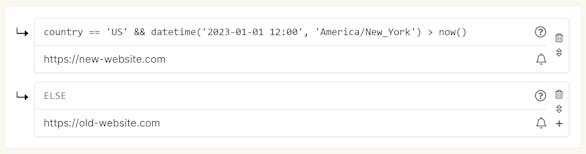
New featureWe're excited to announce our next big feature: dynamic destinations. Dynamic destinations can be used to steer your traffic to different destinations, based on rules you define. Want to redirect only US-based visitors to your US-based website, and all others to the European store? Or perhaps you'd like to redirect your visitors to your new website after a specific date/time? All of this can be accomplished with our versatile rulesets.
Read more about how to use dynamic destinations here.
Forcing two-factor authentication for all users
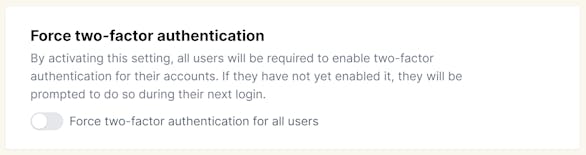
New featureTo improve security even further, team owners now have the ability to enforce Two Factor Authentication (2FA) for all users. This feature can be enabled via the users page. We recommend all users to set up 2FA to ensure account safety.