Vanity URLs: What They Are and How to Set Them Up

Michel Bardelmeijer is Tech Lead and Sales at redirect.pizza, where he helps DevOps and IT teams solve domain redirect challenges at scale. Michel has guided organizations like SD Worx, Zurich Airport and Harvard through complex redirect scenarios involving thousands of domains.
Have questions about bulk redirects, HTTPS migrations, or domain consolidations? Connect with Michel on LinkedIn or reach out to the redirect.pizza team.
A vanity URL is a short, branded web address that uses a redirect to forward visitors to a longer destination URL. Instead of sharing brand.com/page/d/limited-edition-offers-Vpjw-Rz6wc, you share brand.com/LimitedEdition. Same destination, better packaging.
This guide covers what vanity URLs and vanity domains are, how they differ from URL shorteners, and how to set one up in minutes using DNS-based redirects. For the technical foundations behind redirects, see our complete guide to URL redirects.

Key Takeaways
- Behind every vanity URL is a redirect. The branded link is just packaging. The 301 (or 302) redirect to the real destination is what makes it actually work.
- Vanity domains (like youtu.be or wh.gov) take this further by using an entirely separate, custom domain name.
- Unlike URL shorteners (Bitly, TinyURL), vanity URLs use a domain you own, giving you full control over branding, HTTPS, and data.
- HTTPS matters: if your vanity domain does not have a valid SSL certificate, visitors see a security warning instead of your content.
- Vanity URLs are most useful in offline and print marketing where links are not clickable. Skip them in email campaigns, where redirects can trigger spam filters.
What Is a Vanity URL?
Take an auto-generated URL like this:
brand.com/page/d/limited-edition-offers-Vpjw-Rz6wc
Nobody is going to type that into a browser from a magazine ad. A vanity URL replaces it with something clean and memorable:
brand.com/LimitedEdition
Both point to the same page. The vanity URL just adds a redirect in between. Visitors type the short link, the redirect sends them to the real destination, and they never see the ugly URL.
This works in any context where a link needs to be typed from memory: print ads, billboards, podcast mentions, conference slides. It also makes it possible to track how many people visit a link from an offline campaign, since every hit passes through the redirect.
Why Use Vanity URLs?
- Memorability. A short, clean URL beats a long string of parameters and random characters, especially when someone has to type it from memory.
- Brand reinforcement. A vanity URL with your brand name builds recognition every time someone sees or shares the link.
- Trust. Long, complex URLs feel suspicious. A clean vanity link signals legitimacy.
- Flexible link management. You can update the destination without changing the published URL. Campaign over? Point the redirect somewhere else. No reprints, no broken links.
- Better click-through rates. According to a Rebrandly study of over one billion clicks, branded links receive up to 39% more clicks than generic short URLs. The reason is straightforward: people trust links where they can see the brand name.
Vanity URLs vs Vanity Domains
A vanity URL uses your existing domain with a clean path. A vanity domain goes further: you register a separate domain specifically for the redirect.
Real-world vanity domains:
- YouTube: youtu.be
- The White House: wh.gov
- ESPN: es.pn
- Amazon: amzn.to
Organizations often pair a short domain with a distinctive top-level domain (the part after the ".") to make the link stand out even more.
What happens behind the scenes? Each of these vanity domains uses redirects to forward visitors to the real URL. You can inspect the full redirect chain of any vanity domain using the redirect.pizza Redirect Tester. Here is what the chains look like:
| Vanity domain | Hops | Redirect chain | Destination |
|---|---|---|---|
| youtu.be | 2 | 301 → 303 | youtube.com/?feature=youtu.be |
| wh.gov | 2 | 301 → 301 | whitehouse.gov |
| es.pn | 2 | 301 → 302 | espn.com |
| amzn.to | 1 | 301 | amazon.com |
Tested March 17, 2026 using the redirect.pizza Redirect Tester.
Notice that YouTube appends ?feature=youtu.be to the destination URL, tracking that the visit originated from their vanity domain. The same principle applies when you add UTM parameters to your own vanity URLs (more on that in Step 3 below).
You do not need a separate domain to create a vanity URL. You can use your primary domain with a cleaner path. AirBnB does this for city-specific pages:
| Vanity URL | Destination URL |
|---|---|
| airbnb.com/nyc | airbnb.com/s/New-York--NY/experiences |
| airbnb.com/amsterdam | airbnb.com/amsterdam-netherlands/stays |
| airbnb.com/miami | airbnb.com/miami-fl/stays |
Vanity URLs vs URL Shorteners
Vanity URLs and URL shorteners (Bitly, TinyURL, Rebrandly) both produce shorter links. The difference is ownership and control.
A URL shortener gives you a link on someone else's domain: bit.ly/3xK9mQ. You do not control the domain, the branding, or what happens if that service changes its terms, shuts down, or gets flagged as spam. A vanity URL uses a domain you own: brand.com/summer. You control the DNS, the SSL certificate, the redirect logic, and the data.
| Vanity URL | URL shortener | Vanity domain | |
|---|---|---|---|
| Example | brand.com/summer | bit.ly/3xK9mQ | brandoffer.com |
| Domain ownership | You own it | Third party owns it | You own it |
| Branding | Your brand in the URL | Shortener brand in the URL | Fully custom |
| HTTPS control | You manage the certificate (or your redirect service does) | Shortener manages it | You manage it |
| Data | Yours | Stored on shortener platform | Yours |
| CTR impact | Up to 39% higher vs generic short URLs (Rebrandly) | Baseline | Up to 39% higher vs generic short URLs |
| Risk | Minimal (you control the infrastructure) | Service changes terms, shuts down, or gets spam-flagged | Domain registration cost |
For one-off social media posts where branding does not matter, a URL shortener is fine. For marketing campaigns, print materials, and anything tied to your brand identity, use a vanity URL or vanity domain on infrastructure you control.

Best Practices for Vanity URLs
1. The redirect is the foundation. Get it right.
A vanity URL without a working redirect is a broken link. Use a 301 redirect for permanent vanity URLs (brand campaigns, product pages). Use a 302 for temporary ones (seasonal promotions, A/B tests). Set up analytics tracking so you can measure performance from day one.
Do:brand.com/summer 301 redirects to brand.com/campaigns/summer-2026
Don't: Register a vanity domain and forget to configure the redirect. The link breaks.
2. HTTPS is not optional.
If someone types https://your-vanity-domain.com and there is no valid SSL certificate, their browser shows a security warning before the redirect executes. Most visitors leave. This is a common failure with domain registrar forwarding, which handles HTTP but not HTTPS.
DNS-based redirect services provision SSL certificates automatically before traffic arrives. No manual certificate management, no expiration risks.
"Teams often set up a vanity domain, test it over HTTP, and assume it works. Then a visitor types HTTPS, hits a certificate error, and the campaign link is effectively broken. Automatic SSL provisioning eliminates that risk entirely."
– Michel Bardelmeijer, Tech Lead at redirect.pizza
3. Keep it short, clean, and pronounceable.
Good vanity URLs can be read aloud and typed from memory without errors. No dashes, no special characters, no abbreviations, no random numbers.
Do: brand.com/LimitedEdition or brandoffer.com
Don't:brand.com/LE-2026-Q3-promo_v2 or br4nd.com/xK9
4. Skip vanity URLs when they add nothing.
If your original URL is already short and readable, a vanity URL just creates an unnecessary redirect. And in email campaigns, redirected links can trigger spam filters. Use vanity URLs for offline and print marketing, social media, and conference materials. Skip them when the original link already works.
How to Create a Vanity URL with redirect.pizza
redirect.pizza handles the redirect infrastructure, SSL certificates, and analytics for your vanity URLs. No server to configure, no certificates to manage. Here is the process.
- 1
Step 1: Choose your domain, TLD, and slug
Pick a domain name and path that is short, memorable, and relevant. A straightforward .com works. A distinctive TLD like .pizza or .io can make the link stand out. The slug (the path after the domain) should convey what the link leads to in as few characters as possible.
- 2
Step 2: Register the domain
The next step is to choose an appropriate hosting provider for your domain. The use of a redirect service such as redirect.pizza can be a real asset here. redirect.pizza offers extensive link management, which means you can opt for a simple and affordable hosting provider.
redirect.pizza is compatible with almost all hosting providers, including GoDaddy, Namecheap, Cloudflare, Amazon, Azure, Google, and more.
- 3
Step 3: Set up the redirect with UTM tracking
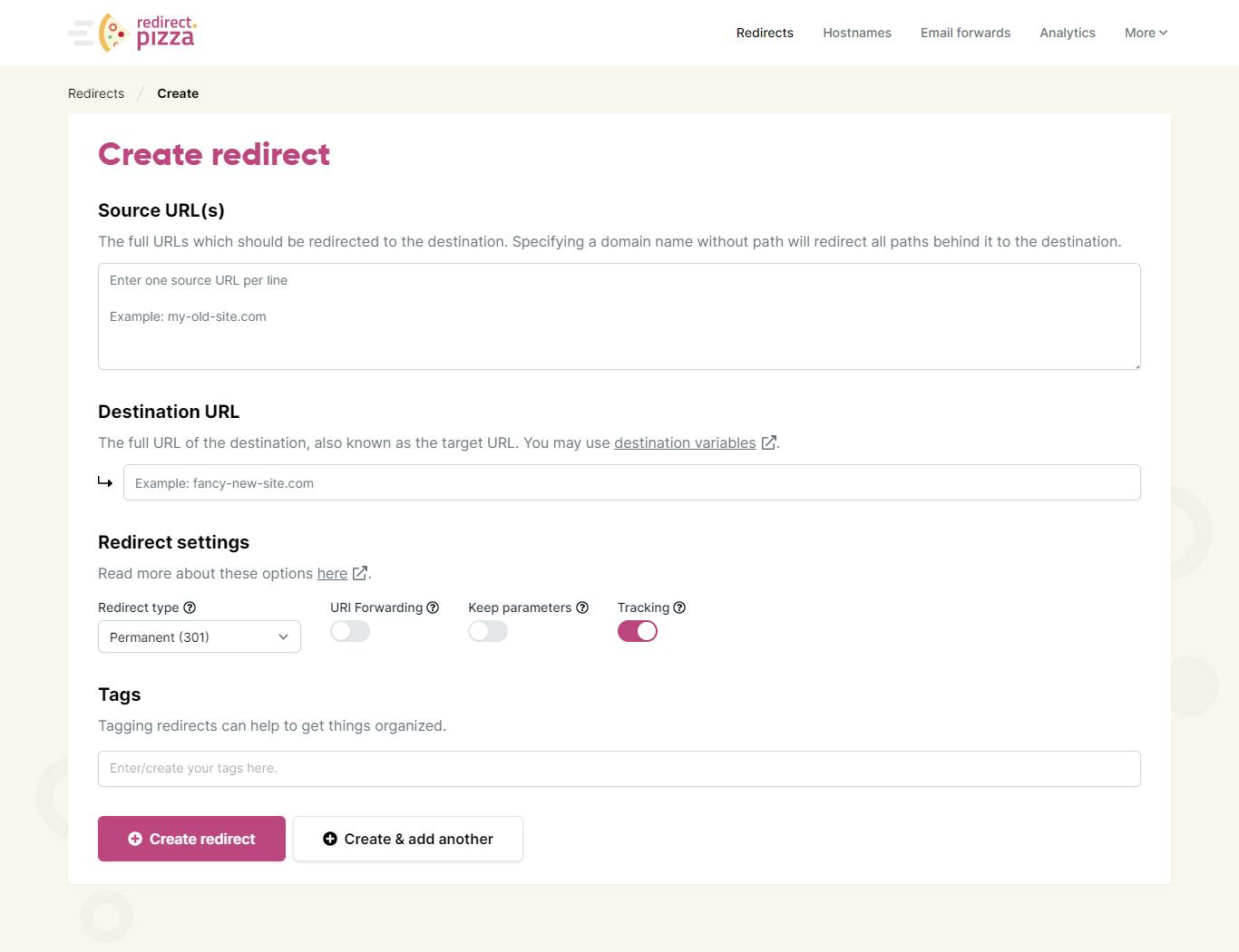
Point the vanity URL to the destination URL. In redirect.pizza, enter the source (your vanity URL), the destination (the real URL), and choose your redirect type (301 for permanent, 302 for temporary).
To track which campaigns drive traffic, add UTM parameters to the destination URL:
Source:
brand.com/summerDestination:
brand.com/campaigns/summer-2026?utm_source=billboard&utm_medium=print&utm_campaign=summer2026Your audience sees and typesbrand.com/summer. Google Analytics receives the UTM data. You can attribute conversions to the specific billboard, flyer, or podcast mention that drove the visit.redirect.pizza automatically provisions an SSL certificate for the vanity domain, so HTTPS works from the moment DNS propagates.

- 4
Step 4: Track performance
redirect.pizza includes built-in analytics showing hits per period, traffic sources, and geographic distribution. Combined with the UTM parameters from Step 3, you get a complete picture: redirect.pizza shows you how many hits the vanity URL receives, and Google Analytics shows you what those visitors do after they arrive.

Frequently Asked Questions
Not exactly. A vanity URL is the branded link that people see and type. The redirect is the mechanism that makes it work. When someone visits brand.com/summer, a 301 or 302 redirect forwards them to the actual destination URL. The vanity URL is the packaging, the redirect is the plumbing.
Vanity URLs themselves do not pass SEO value to the destination page unless you use a 301 redirect, which transfers link equity. For most vanity URL use cases (print campaigns, social media, conference materials), SEO impact is minimal because the vanity link is not indexed or linked to from other websites. If you want the destination page to receive SEO benefit from inbound links, use a 301 redirect rather than a 302.
A vanity URL is only as trustworthy as the domain it uses. If the link uses a domain you recognize (like yourbrand.com/offer), it is safe. The risk with generic short URLs (like bit.ly links) is that you cannot tell where they lead. That is one of the main advantages of vanity URLs: the brand name in the URL signals where the link will take you.
Conclusion
Vanity URLs make links easier to remember, share, and track. They work best in print, social media, and anywhere a URL needs to be typed from memory. The key difference with URL shorteners is ownership: a vanity URL lives on a domain you control, so your branding, data, and HTTPS stay in your hands. Set one up with a DNS-based redirect service, add UTM parameters for campaign tracking, and use the analytics to measure what works.