Additional location fields in analytics
New featureWe've added the ability to view the following in your Raw Analytics per incoming request:
- Continent
- Subdivision (i.e. state/province)
- City
You can filter on these variables by utilizing the new filters:
- "continent:US"
- "subdivision:CA"
Nameservers
New featureWe're excited to announce that we now provide high-performance nameservers to use for redirecting your domains.
By utilizing our nameservers, your DNS records are directly pointed to redirect.pizza.
Find your own nameserver combination at your Team Settings.
Important: only use these nameservers if you understand the implication for your domain. We only recommend using these nameservers if you wish to redirect all traffic (including all subdomains) to your domain.

Add `NOT` rules to analytics filter
ImprovementWe've added the ability to define negated rules by prefixing the filter with a dash ("-"). This allows you to dive into your analytical overview deeper by excluding some traffic.
Example: `-country:US`
We've expanded the Analytics support article for more info. Read more.
Regex matching
New featureYou can now create infinite complex redirect rules by utilizing a regex matching for your path based redirects. Use the capture group results in the destination to pass along specific path elements from the incoming URL. This powerful feature is now available for our users in the Pro plan and up.

API: domains endpoint
New featureWe've added the following API endpoints:
- GET /api/v1/domains
- GET /api/v1/domains/{id}
- POST /api/v1/domains/{id}/check-dns
The `check-dns` endpoint can be handy to force-check a specific domain after the DNS changes have been made with your DNS provider.
Our documentation and PHP SDK are updated as well.
Ability to disable password logins for SAML2 users
ImprovementWhen users have been using password based authentication and SAML2 is activated, users have the ability to either use SAML2 or their original password authentication. This can be useful for the primary team owner, which should be able to fallback to password based authentication in case of a SAML failure.
We've added the ability to disable password authentication for other team members by the owner. This ensures that existing team members before being added with SAML SSO, can have their original password disabled. This strengthens the SAML SSO flow, as it's the only way for authentication.

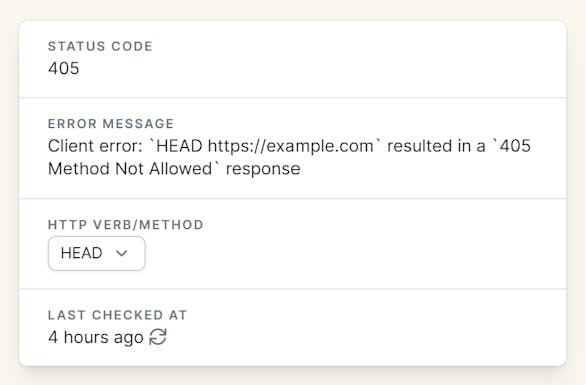
Specify HTTP verb/method for destination monitor
ImprovementHappy to announce that we now have support to select the HTTP verb/method in the destination monitor.
We use HEAD requests for our destination monitoring tool. As some providers might be blocking HEAD requests, we added the ability to specify the HTTP verb. We've added POST/PATCH/PUT support as well.
When a destination returns a 405 status code ('Method not allowed'), we automatically switch to GET requests.
Redirect settings in overview
ImprovementTo provide a better overview of your redirects, we now show the path fowarding & query string forwarding setting of the redirect in the overview, so that you can quickly see where it is enabled or disabled.
- We've added 'path' in the destination when path forwarding is enabled
- We've added 'query' in the destination when query string forwarding is enabled.
