Pizza preference
ImprovementWe've added a handy "not sure which plan to choose" helper on our pricing page, to help figure out which plan best fits your need. You can find it here.

Global search
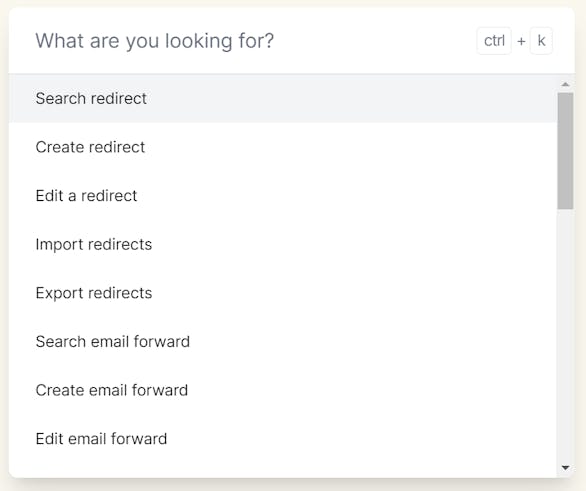
New featureWe're excited to introduce our new global search feature that not only allows you to swiftly locate the information you need but also facilitates quick actions, such as creating a new redirect.
To access this powerful tool, just click on the search icon or use the CTRL+K/CMD+K keyboard shortcut.
redirect.new
New featureWe've jumped on the .new TLD hypetrain. You can now use redirect.new to quickly add new redirects to your account! 💨
Read-only user type
New featureYou can now include read-only user types in your redirect.pizza account, enabling users to access redirects, email forwards, and analytics data while preventing them from making changes or creating new profiles.

Domain information
New featureWe've added a new 'Domain information' block to the hostname detail page, which includes all the essential information about your domain name.
By default, the DNS provider and nameservers are listed. If your top-level domain (TLD) supports RDAP (Registration Data Access Protocol), which is the case for most popular domain TLDs, we'll also provide additional useful details, such as:
- Registration date
- Expiration date
- Registrar
- DNSSEC
- Status
- Last change
We hope this update will provide you with an even better overview of your domain information.

Additional suggestions
New featureWe've expanded our automatic suggestions when adding a redirect with even more suggestions! We previously recommend adding a non-www redirect when redirecting the www variant and visa-verse. We now also:
- Recommend removing path-specific redirects if you also are specifying root path redirects. The specificity of that path is not needed.
- When adding a redirect with the path set to '(*.)' or '{path}', we now automatically recommend enabling 'Path forwarding' instead.
- When specifying a redirect with only a path, and no other root path redirect can be found, we suggest converting that redirect to a root path redirect.
As always, our suggestion engine just provides suggestions. You are still free to add these, but following our suggestions will make your redirect.pizza experience even better.

Schema selector in our tester
ImprovementIt's about the little things. You can now select between both 'http://' & 'https://' schema's in our tester.
Previously you could already prefix your tested URL with the right schema, but just pressing a link is easier right!
Analytics improvements
ImprovementWe've made a few small improvements to our analytics page:
- You can easily apply filters by clicking on a table row on the analytics page. This will apply the filters directly.
- When you have certain filters active and navigate to a different view or use our share link, the filters are now kept.
- Bug squashing: exporting the redirect analytics with tag filters applied previously resulted in a black screen in the PDF. This has now been fixed!