Team management

Invite colleagues to your team and give each of them the level of access they need. redirect.pizza has four roles, and on the Business plan and up you can further scope what a user sees with tags.

Manage users under More, Users. Invited users receive an email with a link to set up their account. Additional team members are available from the Pro plan and up.

Roles

Owner

The owner manages the team. This role has every permission, including billing, team settings, API tokens, automatic DNS, the firewall, SAML SSO, the activity log and inviting or removing users. A team always has at least one owner. Owners can change the role of any user, including promoting a member to owner.

Member

A member does the day-to-day work. Members can:

  • Create, edit, view, import and export redirects
  • Create, edit and view email forwards
  • View and edit hostnames
  • View analytics
  • Manage tags

Members can't manage billing, API tokens, automatic DNS or the firewall, change team settings (such as the team name and default security settings), view the activity log, invite or remove users, or delete the team.

Read-only

A read-only user can view redirects, email forwards, hostnames and analytics, but can't change anything. Use this role to share insights with stakeholders without the risk of accidental changes.

Billing

A billing user only has access to the Billing tab: updating payment details, changing the plan and downloading receipts. This role is meant for your finance department and can't see or change redirects.

Access control with tags

Available from the Business plan and up.

By default, members and read-only users see every redirect in the team. If you organize your redirects with tags, you can restrict a user to specific tags, or exclude specific tags. Redirects, hostnames, email forwards and analytics are then scoped accordingly. The same mechanism is available for API tokens.
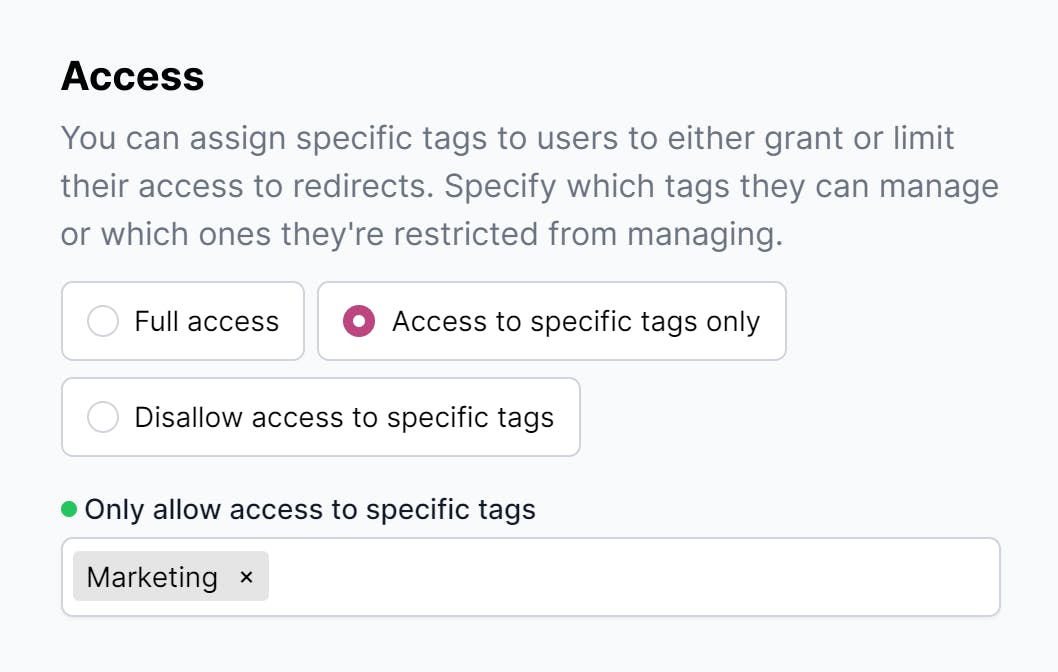
Access control settings for a user

Example 1: a dedicated environment for marketing

Tag every marketing redirect with Marketing. Then give each marketing team member access to the Marketing tag only. They see and manage exactly the redirects that are relevant to them, and nothing else.

Example 2: broad access with one exception

Tag the redirects that should stay private with Restricted, and exclude that tag for the users concerned. They keep access to everything else, while the restricted redirects are only visible to owners and to users who are explicitly allowed.

More articles

Setup & Configuration
What are these DNS changes?
What DNS types can I use?
How long does the DNS change take?
Troubleshooting new redirects
Redirecting non-www to www
Redirect settings
Matching
Regex matching
Wildcard subdomains
Destination variables
Dynamic destinations
Redirect flattening
SSL profiles
robots.txt
Monitoring redirect.pizza itself
Features
Automatic HTTPS
Automatic DNS
Nameservers
Analytics
Broken destination monitoring
Email forwarding
Pause and resume
Dedicated IP
API
MCP
Zapier
Terraform provider
Security & Account
Team management
Two-factor authentication
SAML SSO
SSO via Okta
Summary email
HSTS (HTTP Strict Transport Security)
Prevent foreign embedding
Web Application Firewall (WAF)
Security & compliance
Subprocessors
Service level agreement (SLA)
Walkthroughs
GoDaddy: Forwarding with HTTPS support
Namecheap: Forwarding with HTTPS support
Cloudflare: Forwarding with HTTPS support
Network Solutions: Forwarding with HTTPS support
Hover: Forwarding with HTTPS support
Amazon Route 53: Forwarding with HTTPS support
Google Cloud DNS: Forwarding with HTTPS support
Azure DNS: Forwarding with HTTPS support
DigitalOcean: Forwarding with HTTPS support
NS1: Forwarding with HTTPS support
DNS Made Easy: Forwarding with HTTPS support
TransIP: Forwarding with HTTPS support
EuroDNS: Forwarding with HTTPS support
Mijndomein: Forwarding with HTTPS support
Freenom: Forwarding with HTTPS support

Domain redirects delivered hassle-free

Get started right away

  • Free plan
  • No creditcard required

redirect.pizza has all your favorite ingredients

Analytics

Who is still visiting those old domains? Gain valuable insight with detailed statistics and find out where the hits are coming from.

Learn more

API/MCP

Connect your software or AI clients to create redirects via our API and MCP. Automation makes your life easier.

Learn more

Destination Variables

You control how we handle your destination URL. Want to include your domain extension as a query string parameter? No problem.

Learn more

Dynamic destinations

Steer your traffic to different destinations, based on rules you define.

Learn more

Path forwarding

Keep the original path and keep it in the destination for a smooth domain migration and keeping your SEO game intact.

Learn more

Query Parameter Forwarding

Forward query parameters found on the source URL to the destination.

Learn more

Multiple Redirect Types

Choose the status code that works for you. Choose 301/307 (permanent), 302/308 (temporary) or frame your destination.

Learn more

Team management

Doing things all by yourself isn't much fun. Invite your co-workers to manage the redirects and work as a team.

Learn more

Automatic DNS

Integrate directly with your DNS provider, and apply the DNS changes from one platform.

Learn more

QR code generator

Create a QR code that you can use for marketing purposes. You can change the destination anytime after printing.

Learn more

Import & Export

Manage your redirects without losing precious time. Import and export redirects in our UX-friendly interface.

Global edge network

Redirecting in a blink of an eye; processing millions of request per hour in milliseconds.

Learn more

Broken destination monitor

Automatically checking your destinations to ensure it's reachable for everyone.

Learn more

Privacy First

We're based in Europe and are fully compliant with GDPR. Privacy-first!

Learn more

Wildcard subdomains

For when your domain utilizes a lot of different subdomains. Cover all subdomains with a single redirect.

Learn more

Tags

Group your redirects by adding tags. Keep everything organized and easy to find.

Bulk actions

Want to apply the same action for multiple redirects in one go? Do yourself a favor and start using bulk actions.

Dark mode

Give your eyes some well deserved rest by using the dark mode. Sync with your system or choose manually.

HSTS

Enable HSTS (HTTP Strict Transport Security) on team or domain level for an extra layer of protection.

Learn more

Change Destination Anytime

Once you're set up, you can change the destination URL anytime you want, and see the change in real-time.

Two-Factor Authentication

Secure your account with TOTP two-factor authentication. Scan the QR code, setup your app of choice, and you're safe(er).

Learn more

IDN Support

Add international hostnames with non-Latin characters. We ❤ that.

Support

Chat away! We're happy to help set up your account and answer your questions.